
KeyboardClipboard History
Mac clipboard history
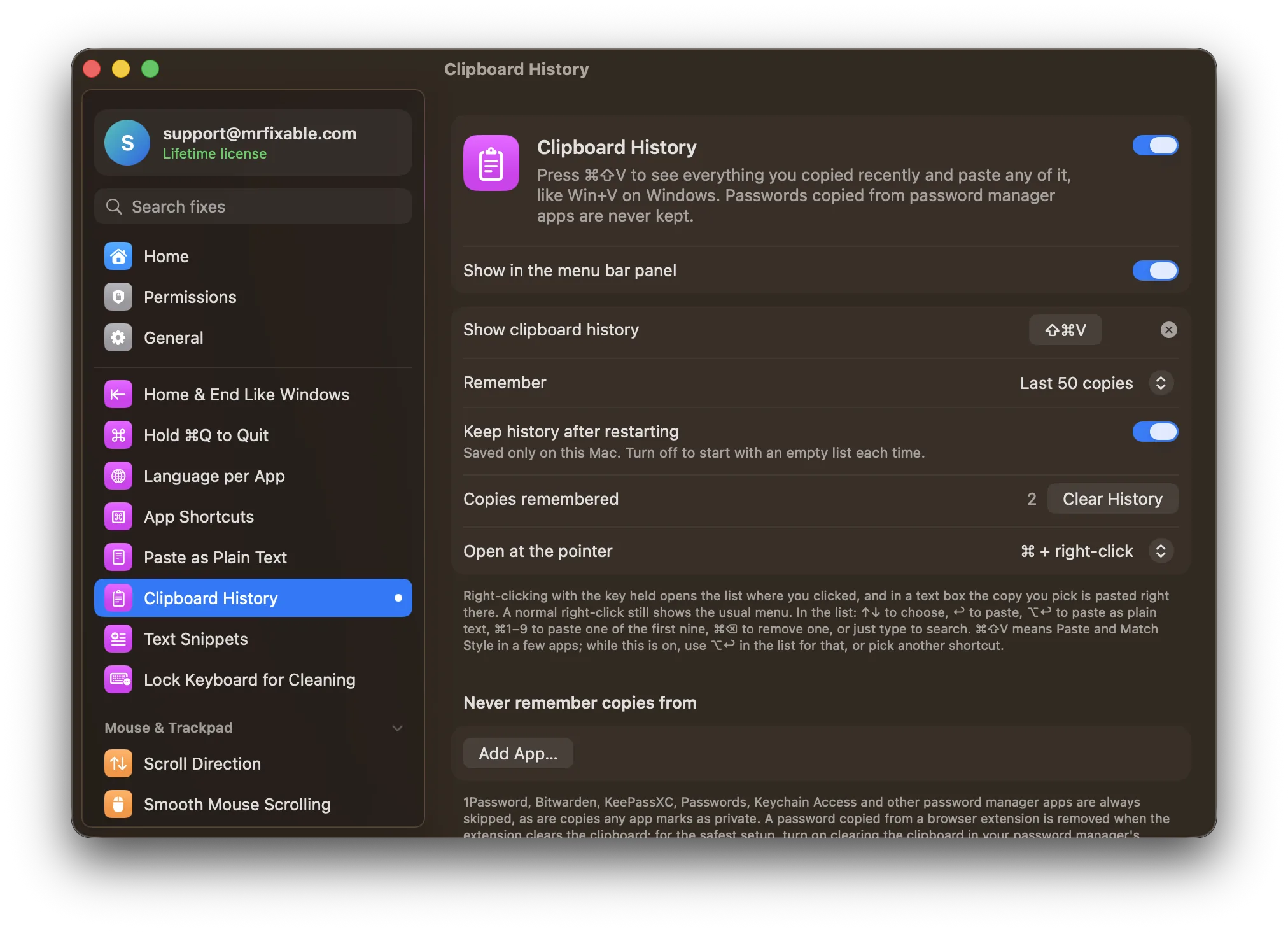
macOS Tahoe has a basic Mac clipboard history in Spotlight: press ⌘Space, then ⌘4, and allow clipboard results the first time. Earlier versions keep only your last copy. Clipboard History works on macOS 14.2 and later: press ⌘⇧V in any app, pick one of your recent copies, and it's pasted right where you're typing.
Try free for 14 daysBuy for $19.99 Lifetime license
One of 68 fixes in MrFixable. Lifetime license, no subscription. Updated October 22, 2026. Works on macOS 14.2 Sonoma and later. Checked on macOS 26 Tahoe.
What Clipboard History does
The problem
A Mac's clipboard holds one thing at a time, so copying something new loses what you copied before. macOS Tahoe added a clipboard to Spotlight (⌘Space, then ⌘4), but it lives inside Spotlight, away from where you're typing, and older versions of macOS don't have it at all.
With Clipboard History
Press ⌘⇧V wherever you're typing to see everything you copied recently, then pick one and it's pasted right there. Text, links, images and files are all kept.
- Made for the keyboard↑↓ to choose, ↩ to paste, ⌥↩ to paste as plain text, ⌘1 to ⌘9 for the first nine, and ⌘⌫ to remove one. Or just type to search.
- Open it at the pointerHold ⌘ and right-click to open the list where you clicked, and in a text box your pick is pasted right there. A normal right-click still shows the usual menu. You can use ⇧ or ⌃⌥ instead, or turn this off.
- Passwords stay outCopies from 1Password, Bitwarden, KeePassXC, Passwords, Keychain Access and other password managers are never kept, nor are copies any app marks as private. Add any other app you want skipped.
- Formatting keptCopied text keeps its formatting when you paste it with ↩. Copy the same thing twice and it moves to the top instead of appearing twice.
Good to know
Needs Accessibility access, which macOS requires for an app that pastes into the app you were using.
Remembers your last 50 copies by default (25 to 500) and keeps them after a restart, unless you turn that off. The history is saved only on this Mac.
⌘⇧V means Paste and Match Style in a few apps. While Clipboard History is on, use ⌥↩ in the list for that, or choose another shortcut.
Switch it off and nothing new is recorded. Clear History deletes everything saved.
Questions
Where is the clipboard on a Mac?
In Finder, choose Edit › Show Clipboard to see the one thing you copied last. On macOS Tahoe, recent copies are also in Spotlight: press ⌘Space, then ⌘4. With Clipboard History on, press ⌘⇧V in any app, or choose Show Clipboard History in MrFixable's menu, to see your recent copies in a list.How do I see clipboard history on a Mac?
On macOS Tahoe: 1. Press ⌘Space to open Spotlight. 2. Press ⌘4, or click the clipboard button next to the search field. 3. Allow clipboard results if asked. With Clipboard History: 1. Turn it on in MrFixable. 2. Press ⌘⇧V in any app. 3. Pick a copy with ↑↓ and press ↩ to paste it.Is there a clipboard history on a Mac?
Yes, since macOS Tahoe: Spotlight shows recent copies when you press ⌘Space, then ⌘4, once you allow clipboard results. Earlier versions of macOS keep only your last copy. Clipboard History adds a list on macOS 14.2 and later, keeps your last 50 copies or up to 500, and opens with ⌘⇧V in any app.Does a Mac have a clipboard?
Yes. Every Mac has a clipboard that holds what you last copied with ⌘C or cut with ⌘X, and ⌘V pastes it. You can view it in Finder with Edit › Show Clipboard. It holds one item at a time, so Clipboard History keeps a list of your recent copies to paste from instead.Does a Mac save clipboard history?
Not before macOS Tahoe: copying something new replaces what was there. On Tahoe, Spotlight keeps recent copies once you allow clipboard results, and you can clear them from its More button. Clipboard History saves your recent copies on your Mac, keeps them after a restart unless you turn that off, and deletes them all with Clear History.How do I open Mac clipboard history with a shortcut?
1. Turn on Clipboard History in MrFixable. 2. Press ⌘⇧V in any app to open the list, or hold ⌘ and right-click where you want to paste. 3. Type to search, then press ↩ to paste, or ⌘1 to ⌘9 for one of the first nine. Record a different shortcut in its settings if you prefer.Is there a clipboard app for Mac that works like Win+V?
Yes. Clipboard History works the same way as Win+V on Windows: press ⌘⇧V, pick one of your recent copies, and it's pasted where you're typing. It keeps text, links, images and files, skips copies from password managers, and saves the history only on your Mac. You can change the shortcut.
Sources
Guides
- How to see your clipboard history on a MacSee your clipboard history on a Mac: open macOS Tahoe's Spotlight clipboard with ⌘Space, then ⌘4, learn where it falls short, and get a history like Win+V.
- How to cut and paste on a Mac: text, files and picturesHow to cut and paste on a Mac with ⌘X and ⌘V, the Edit menu or a right-click, why files need ⌥⌘V instead, and how to make ⌘X move files in Finder.
- How to make text snippets on a Mac with text replacementHow to make text snippets on a Mac with the built-in text expander, step by step, why replacements stop working, and how to add dates and your clipboard.
- How to paste without formatting on a MacHow to paste without formatting on a Mac: ⌥⇧⌘V, the way to do it in Word, Pages and Google Docs, why it sometimes fails, and one shortcut for every app.
Compare
- Coming from Windows?On Windows: Clipboard history with ⊞V. Clipboard History brings it to your Mac. See every Windows habit and its Mac fix.
- Clipboard History vs BetterTouchToolA BetterTouchTool alternative for Mac makes sense if you only use it for a few common jobs. BetterTouchTool lets you build almost any gesture, shortcut or automation yourself. MrFixable gives you ready-made fixes instead, like Window Snapping, Window Switcher, Clipboard History and Mouse Back & Forward, each turned on with one switch, for $19.99 once.
- Clipboard History vs CopyClipCopyClip is a menu bar clipboard manager from FIPLAB. The original is free, and CopyClip 2 costs $7.99, with search, pinning and up to 9,999 text clippings. MrFixable's Clipboard History opens with ⌘⇧V where you're typing, keeps text, images and files, and skips password managers. It costs $19.99 once, with 67 other fixes.
- Clipboard History vs MaccyMaccy is a free, open-source clipboard manager for Mac that keeps your copy history and lets you search and paste from it. MrFixable’s Clipboard History is a Maccy alternative for the same core job: press ⌘⇧V, type to search, and paste. Maccy adds pinned items; MrFixable never keeps copies from password manager apps.
- Clipboard History vs PastePaste is a clipboard manager for Mac, iPhone and iPad, sold as a subscription from $2.49 a month or $29.99 a year. MrFixable's Clipboard History is Mac only and simpler: press ⌘⇧V, search your recent copies and paste one. It keeps up to 500 copies on your Mac, with no sync, and costs $19.99 once.
- Clipboard History vs PastePalPastePal is a clipboard manager for Mac, iPhone and iPad with unlimited history, collections and iCloud sync, sold as a $14.99 one-time Pro unlock. MrFixable's Clipboard History is simpler and Mac only: press ⌘⇧V, pick a recent copy, and it's pasted where you're typing. It costs $19.99 once, with 67 other fixes.