
Sound fixes for Mac
Your Mac has no volume mixer: the volume keys and System Settings › Sound change every app at once, and the Music app's equalizer only covers Music. These nine fixes add a volume slider for each app, a 10-band equalizer for everything, a mic mute shortcut, AirPods that keep their sound quality, and outputs that stay where you set them.
Try free for 14 daysBuy for $19.99 Lifetime license
9 of the fixes in MrFixable. Lifetime license, no subscription. Updated October 21, 2026. Works on macOS 14.2 Sonoma and later.
Sound fixes
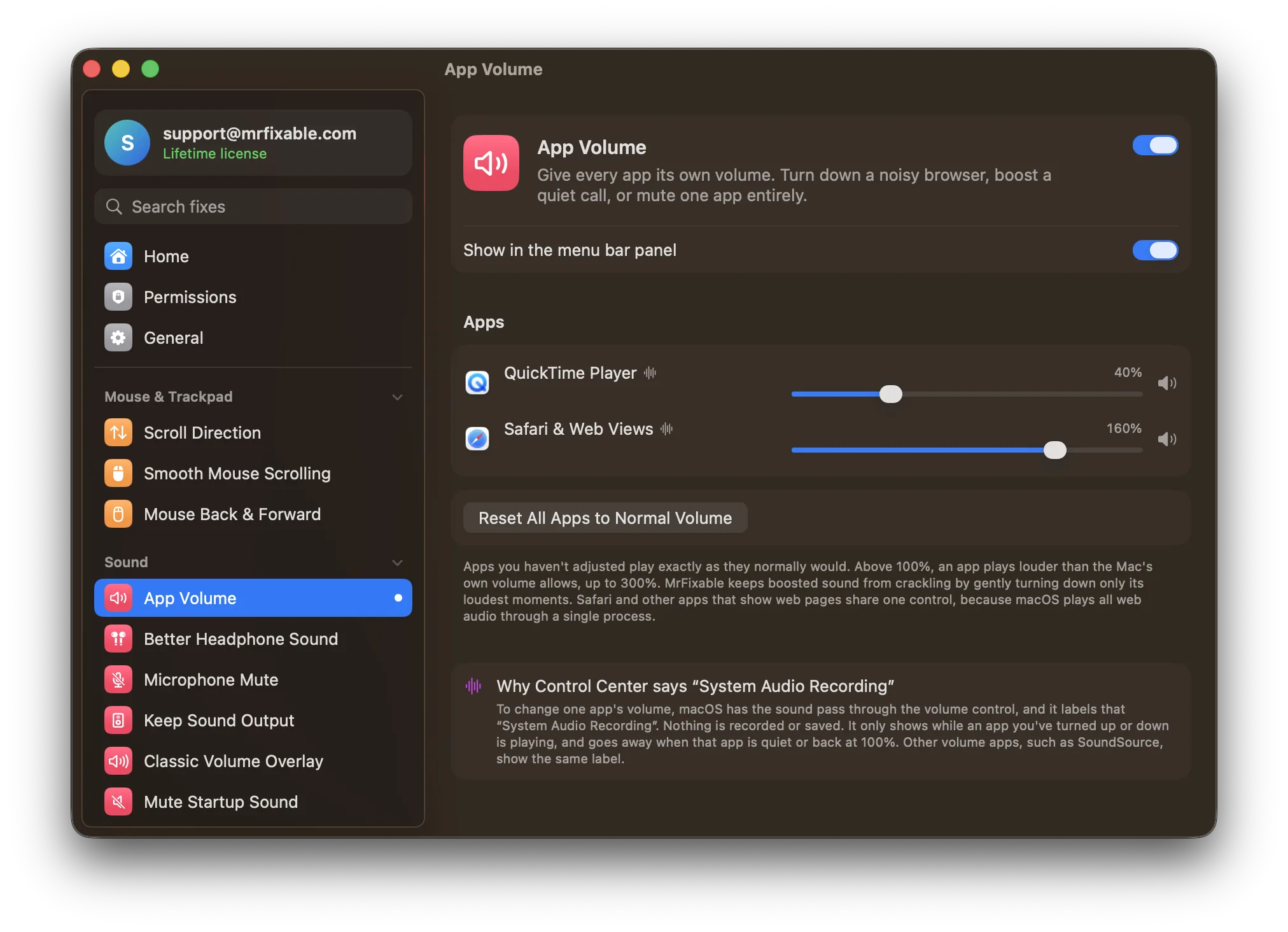
- App VolumeThe volume keys, Control Center's Sound slider and System Settings › Sound all change every app at once. App Volume adds a mixer to your menu bar, with a slider for each app that plays sound. Turn a noisy browser down, mute one app while the rest keep playing, or boost a quiet call up to 300%.
- Keep Headphones Sounding GoodWhen an app uses the microphone in AirPods or other Bluetooth headphones, they switch to a muffled, call-quality mode. Choosing your Mac's microphone in System Settings › Sound › Input fixes it until the input switches back. Keep Headphones Sounding Good sets it back to your Mac's microphone every time, so your headphones keep their full sound.
- Microphone Mute ShortcutmacOS has no shortcut that mutes the microphone itself. You drag Input volume to the left in System Settings › Sound › Input, or use each call app's own mute button. Microphone Mute Shortcut mutes the microphone in every app at once with ⌃⌥M, shows a sign on screen and changes the menu bar icon while it's off.
- Keep Sound OutputPlug in a monitor, TV or AirPlay speaker and macOS often moves your sound to it. You can switch back in Control Center or System Settings › Sound › Output, but macOS does it again the next time. Keep Sound Output moves the sound straight back to the speakers or headphones you were using.
- Keep MicrophoneZoom, Teams and browsers move your microphone's input level up and down, and macOS switches to a webcam, monitor or iPhone microphone when one connects. You can set the level in System Settings › Sound › Input, but it won't stay. Keep Microphone holds the level and the microphone you chose, and puts them back.
- System EqualizermacOS has no equalizer for everything it plays: the one in the Music app, under Window › Equalizer, only changes songs in Music. System Equalizer shapes all your Mac's sound with 10 bands, from Spotify and YouTube to games and calls, with presets such as Bass Boost, Vocal and Laptop Speakers.
- Stop Music Opening by ItselfPress the play key with nothing playing, or connect AirPods, and macOS opens Apple Music. There's no setting to stop it, though keeping your own music app open helps. Stop Music Opening by Itself closes Music the moment it opens on its own, and can open Spotify or another app instead. Hold ⌥ to open Music on purpose.
- Classic Volume OverlaymacOS 26 Tahoe replaced the big on-screen volume indicator with a small slider at the top right of the menu bar, so it's easy to miss the level, or that you've muted. There's no setting to bring it back. Classic Volume Overlay shows a large overlay again, with the level and your speakers' name. Only on macOS 26.
- Mute Startup SoundTo silence the startup chime, open System Settings › Sound and turn off Play sound on startup. Mute Startup Sound changes that same setting from MrFixable, once you enter your administrator password. The setting is stored in your Mac's firmware, so the chime stays off even after you quit MrFixable.
Questions
How do I fix AirPods sound quality on a Mac?
Stop the Mac from using the AirPods' microphone. 1. Open System Settings › Sound. 2. Click Input. 3. Choose your Mac's built-in microphone, or a wired or USB one. 4. Choose the same microphone in your call app's audio settings. Keep Headphones Sounding Good repeats step 3 whenever the input switches back to your AirPods.Why do my AirPods sound muffled on a Mac?
An app is using the AirPods' microphone, so Bluetooth switched to a headset mode that carries sound both ways at lower quality. To fix it: 1. Open System Settings › Sound › Input. 2. Choose your Mac's microphone. 3. Choose it in your call app too, or turn on Keep Headphones Sounding Good to keep it chosen.How do I change the sound output on a Mac?
1. Choose Apple menu › System Settings. 2. Click Sound in the sidebar. 3. Click Output. 4. Select the speakers or headphones you want. For a quicker switch, click Control Center in the menu bar, click Sound and pick a device. If macOS keeps moving sound to a monitor or TV, Keep Sound Output moves it back.Why does my Mac input volume keep changing?
Usually a call app or browser is moving it: Zoom, Teams and Chrome adjust your input level to match your voice. 1. Set your level in System Settings › Sound › Input. 2. In Zoom, open Settings › Audio and uncheck Automatically adjust microphone volume. 3. For other apps, turn on Keep Microphone and its Keep the input level option.How do I stop Apple Music opening automatically on a Mac?
macOS has no setting for it. 1. Click the MrFixable icon in the menu bar. 2. Switch on Stop Music Opening by Itself. 3. If you like, choose Spotify or another app under Open instead in its settings. Music now closes the moment it opens on its own. Hold ⌥ (Option) while you open Music when you want it.Why is the volume bar on my Mac not working?
On macOS 26 Tahoe it isn't broken, it moved. The big bar in the middle of the screen was replaced by a small slider at the top right of the menu bar. To get a large overlay back: 1. Click the MrFixable icon in the menu bar. 2. Switch on Classic Volume Overlay. 3. Press a volume key.How do I turn off the microphone on a Mac?
1. Open System Settings › Sound. 2. Click Input. 3. Drag the Input volume slider all the way to the left, and remember to drag it back afterwards. For one shortcut that mutes the microphone in every app, turn on Microphone Mute Shortcut and press ⌃⌥M (Control-Option-M) to mute, and again to unmute.