
SoundSystem Equalizer
Mac equalizer for everything your Mac plays
A Mac has no system-wide equalizer. The Music app has one under Window › Equalizer, but it only changes songs played in Music. System Equalizer adds a 10-band equalizer to everything your Mac plays, from Spotify and YouTube to games and calls, with presets such as Bass Boost, Vocal and Laptop Speakers.
Try free for 14 daysBuy for $19.99 Lifetime license
One of 68 fixes in MrFixable. Lifetime license, no subscription. Updated October 22, 2026. Works on macOS 14.2 Sonoma and later. Checked on macOS 26 Tahoe.
What System Equalizer does
The problem
macOS has no equalizer for everything it plays. The Music app has one under Window › Equalizer, but it only changes songs played in Music, not Spotify, videos in your browser, games or calls.
With System Equalizer
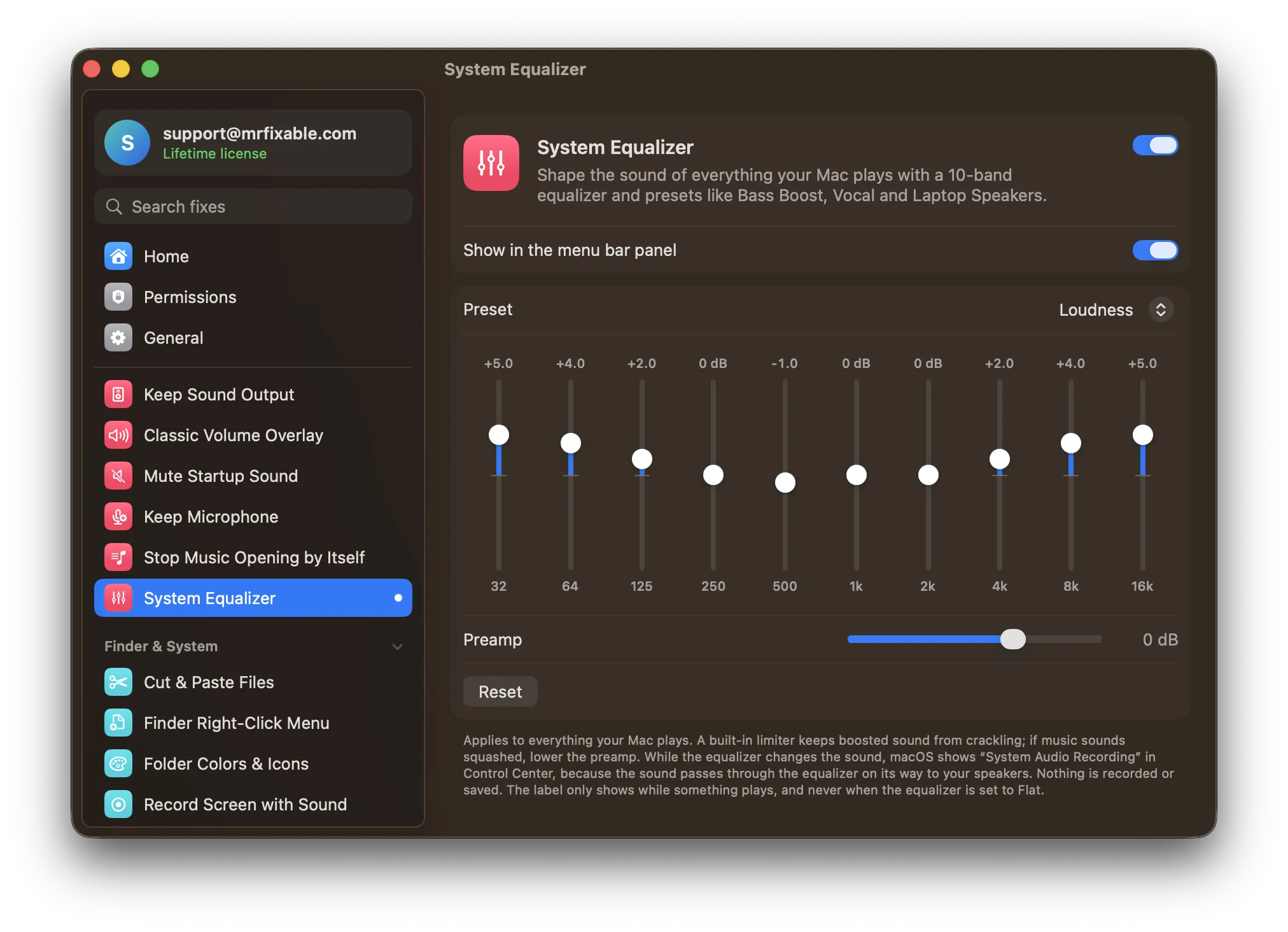
Everything your Mac plays goes through a 10-band equalizer on its way to your speakers or headphones. Choose a preset or drag the sliders, and switch presets from the MrFixable menu.
- 10 bands, ±12 dBFrom deep bass at 32 Hz to the top of the treble at 16 kHz, up to 12 dB up or down. Double-click a slider to put it back to 0 dB.
- Presets for common problemsBass Boost, Bass Reducer, Treble Boost, Vocal, Loudness, Laptop Speakers and Headphones, or Flat. Pick one from the MrFixable menu without opening a window.
- Boost without cracklingA preamp from −12 to +6 dB and a built-in limiter keep boosted sound clean. If music sounds squashed, lower the preamp.
Good to know
Needs System Audio Recording permission, which macOS requires for any app that changes sound on its way to your speakers. Nothing is recorded or saved.
Control Center shows System Audio Recording only while something plays, and never when the equalizer is set to Flat.
Apps you've turned up or down in App Volume get the same equalizer curve.
Switch it off and your Mac sounds exactly as it did before.
Questions
Does Mac have an equalizer?
Only in the Music app. Choose Window › Equalizer in Music to shape songs you play there, but it doesn't change Spotify, YouTube, games or calls. macOS has no equalizer for all sound. System Equalizer adds one: 10 bands and presets for everything your Mac plays, switchable from the menu bar.How do I adjust EQ on Mac?
For songs in the Music app: 1. Open Music. 2. Choose Window › Equalizer. 3. Turn it on and pick a preset or drag the sliders. For everything else: 1. Switch on System Equalizer in MrFixable. 2. Open its settings. 3. Choose a preset or drag the 10 sliders.How do I EQ Mac output?
macOS can't equalize all of its output, so use System Equalizer: 1. Click the MrFixable icon in the menu bar and switch on System Equalizer. 2. Pick a preset from the menu, such as Bass Boost or Vocal. 3. For finer control, open its settings and drag the sliders from 32 Hz to 16 kHz.Is there an equalizer on MacBook Pro?
Not for all sound. A MacBook Pro has the same macOS as other Macs: only the Music app has an equalizer, under Window › Equalizer, and it only changes music played in Music. System Equalizer works on everything, and its Laptop Speakers preset is made for the small built-in speakers of a MacBook.How do I boost the bass on my Mac?
Turn on System Equalizer and choose the Bass Boost preset, which raises the 32 to 250 Hz bands. Or drag those sliders up yourself. If loud moments start to sound squashed, lower the preamp a little. Bass Boost works on everything your Mac plays, including Spotify, YouTube and games.Can I make my MacBook speakers sound better?
Try the Laptop Speakers preset in System Equalizer. It turns down the deepest bass, which small speakers struggle to play, and lifts the low mids and treble, so voices and music sound fuller and clearer. If you prefer, start from that preset and adjust single sliders until it sounds right.Why does Control Center say System Audio Recording?
The sound passes through the equalizer on its way to your speakers, and macOS labels that System Audio Recording. Nothing is recorded or saved. The label only shows while something is playing, and goes away when your Mac is quiet or the equalizer is set to Flat.
Sources
The full guide
Compare
- System Equalizer vs eqMaceqMac is a free system-wide equalizer for Mac, with Pro features from $3 a month, $30 a year or $40 once. MrFixable's System Equalizer does the core job: a 10-band equalizer with presets for everything your Mac plays. eqMac offers more, like headphone presets and unlimited bands in Pro. MrFixable bundles its equalizer with 67 other fixes.
- System Equalizer vs SoundSourceSoundSource from Rogue Amoeba is a $49 Mac app for per-app volume, output routing and audio effects. MrFixable's App Volume covers the core: a slider for each app, mute, and a boost to 300%. It can't send apps to different outputs or add per-app effects. MrFixable costs $19.99 once and also includes a System Equalizer.