
eqMac alternative for Mac
By Mohammed Chaara. Updated October 21, 2026. Facts about eqMac come from its own website or App Store page, listed at the end.
What eqMac is
eqMac is a system-wide audio equalizer for Mac. The free version has a basic equalizer for bass, mids and treble, an advanced equalizer with 10 fixed bands, reference presets for more than 4,600 headphones, Super Presets that switch on their own by output device or app, volume boost beyond 100%, and volume and balance for HDMI and DisplayPort devices. eqMac Pro adds an expert equalizer with unlimited bands and adjustable frequency, gain, bandwidth and filter type, a spectrum analyzer, an App Mixer for per-app volume, spatial audio and Audio Unit hosting. Pro costs from $3 a month or $30 a year, or $40 once for one Mac. eqMac runs on macOS 10.13 or later, on Intel and Apple silicon. Its GitHub repository holds the free parts of an older version, 1.3.2, under the Apache-2.0 license.
eqMac vs MrFixable
| eqMac | MrFixable | |
|---|---|---|
| Price | Free; Pro from $3 a month or $30 a year, or $40 once for one Mac | $19.99 once (Lifetime license) for all 68 fixes, free for 14 days |
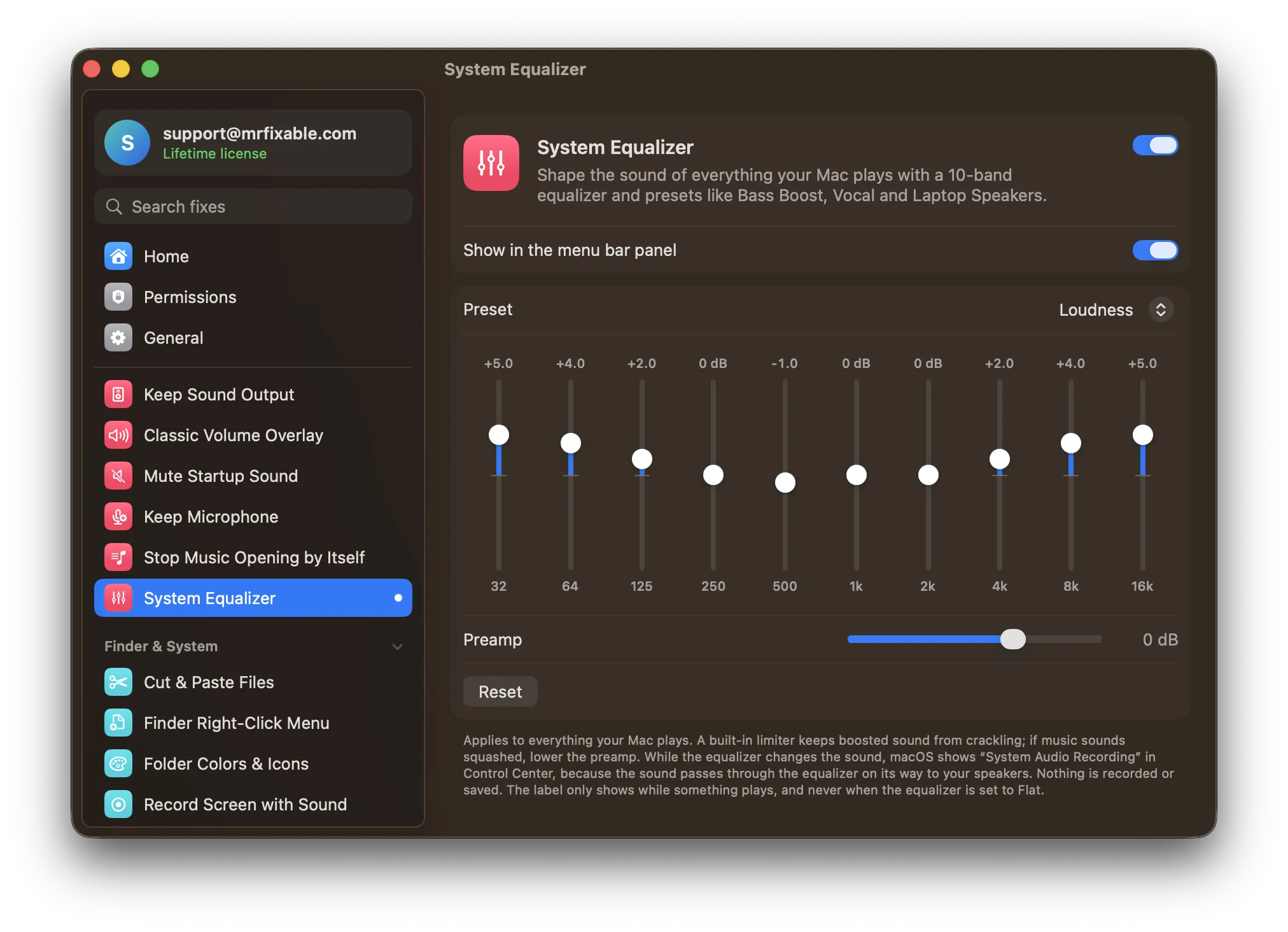
| Equalizer bands | 10 fixed bands free; unlimited bands with frequency, gain, bandwidth and filter type in Pro | 10 bands from 32 Hz to 16 kHz, up to 12 dB up or down |
| Presets | Reference presets for 4,600+ headphones; Super Presets switch by device or app | 8 presets: Flat, Bass Boost, Bass Reducer, Treble Boost, Vocal, Loudness, Laptop Speakers, Headphones |
| Volume | Boost beyond 100%, balance, HDMI and DisplayPort volume | Preamp from −12 to +6 dB, with a limiter that keeps boosted sound from crackling |
| Per-app volume | App Mixer, in Pro | App Volume, a separate fix included in the price |
| Spectrum analyzer and Audio Units | Yes, in Pro | No |
| macOS | macOS 10.13 or later, Intel and Apple silicon | macOS 14.2 Sonoma or later |
| Source code | Free parts of version 1.3.2 on GitHub (Apache-2.0) | Closed source |
Where each one is better
- The 10-band equalizer, volume boost and balance are free.
- It has reference presets for more than 4,600 headphones, and Super Presets that switch on their own by output device or app.
- Pro gives a fully adjustable equalizer with unlimited bands, plus a spectrum analyzer, spatial audio and Audio Unit hosting.
- It runs on much older macOS, from macOS 10.13.
- Part of its code is open source on GitHub.
- One price, $19.99 once, with no subscription, for the equalizer, App Volume and MrFixable's other fixes.
- Presets for common problems, like Laptop Speakers for small MacBook speakers, and you can switch presets from the MrFixable menu without opening a window.
- A built-in limiter keeps boosted sound from crackling.
- Sound only passes through the equalizer while something plays and the curve isn't Flat.
- Switch it off and your Mac sounds exactly as it did before.
Switching from eqMac
Quit eqMac so your sound isn't equalized twice, then open System Settings › Sound, click Output and pick your speakers or headphones. In MrFixable, turn on System Equalizer and allow System Audio Recording when macOS asks: nothing is recorded or saved. Choose the preset closest to what you used in eqMac, or drag the ten sliders to match your old curve. MrFixable remembers your settings.
Questions
Does Mac have an equalizer?
Only in the Music app. Open Music and choose Window › Equalizer, but it changes only songs played in Music, not Spotify, videos in your browser, games or calls. For all sound, you need an app such as eqMac or MrFixable's System Equalizer, which adds a 10-band equalizer to everything your Mac plays.Is eqMac free?
Yes, the main version is free. It includes a 10-band equalizer, headphone presets, volume boost and balance. eqMac Pro adds an equalizer with unlimited bands, the App Mixer for per-app volume and spatial audio, for $3 a month, $30 a year or $40 once for one Mac, according to eqmac.app.How do I adjust EQ on a Mac?
Turn on System Equalizer in MrFixable, then pick a preset such as Bass Boost or Vocal from its menu, or open its settings and drag the ten sliders. Double-click a slider to put it back to 0 dB. If boosted music sounds squashed, lower the preamp. For the Music app only, use Window › Equalizer.Can I use eqMac and MrFixable at the same time?
Yes, but don't run both equalizers at once, or your sound is shaped twice and the boosts add up. Pick one for equalizing. If you keep eqMac for its headphone presets, leave System Equalizer off in MrFixable and use MrFixable's other fixes as usual.