
Mac volume mixer with a slider for each app
One of 68 fixes in MrFixable. Lifetime license, no subscription. Updated October 22, 2026. Works on macOS 14.2 Sonoma and later. Checked on macOS 26 Tahoe.
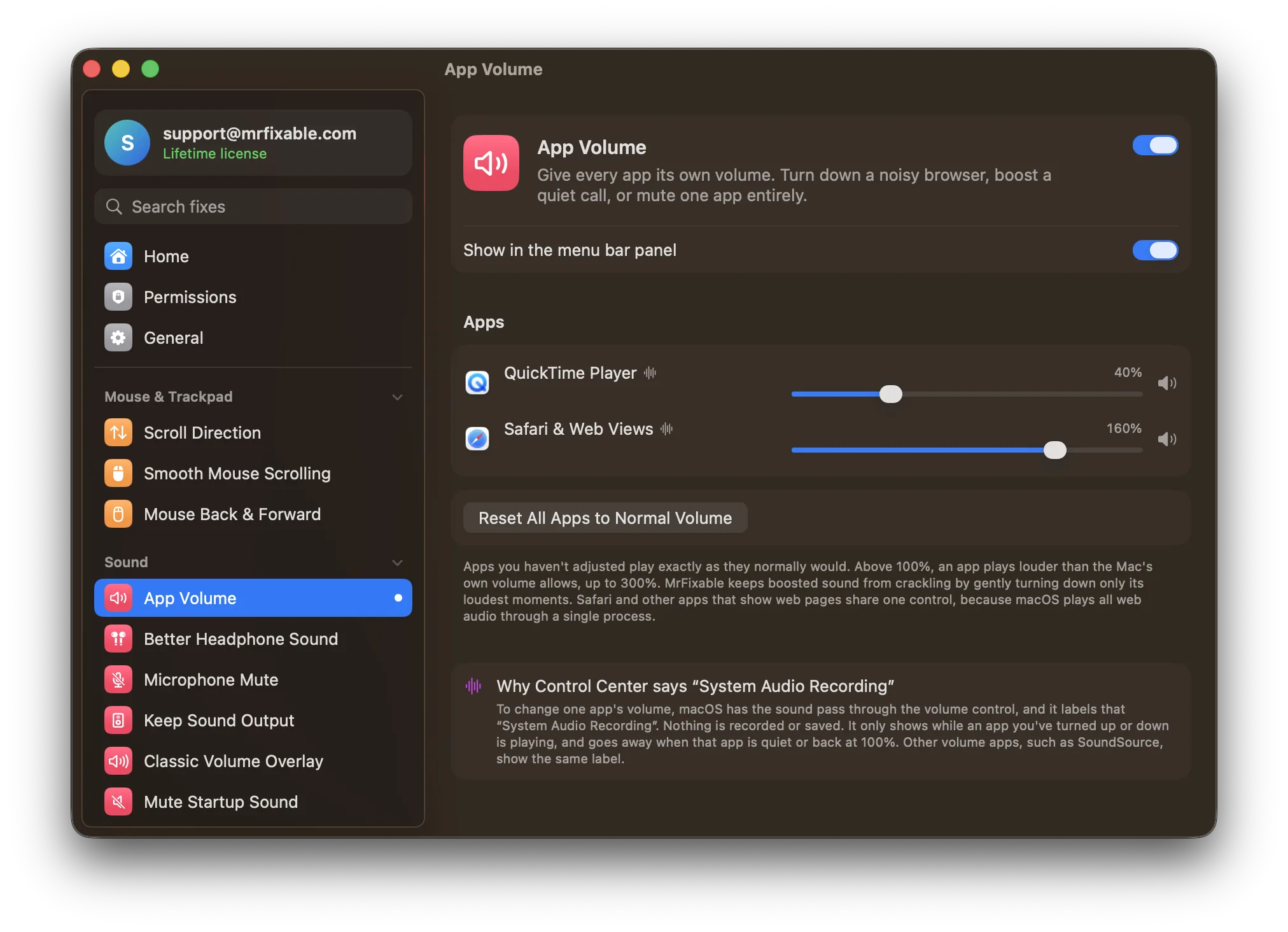
What App Volume does
- A mixer in your menu barApps show up once they play sound and stay listed while they're open. The volume you set for each app is remembered, so a browser you turned down stays down next time.
- Louder than your Mac allowsTurn a quiet app up to 300%, louder than it plays even with the Mac's volume all the way up. A built-in limiter turns down only the loudest moments, so boosted sound doesn't crackle.
- Mute or reset one appClick the speaker next to an app to mute it while the rest keep playing. Right-click it to put that app back to normal volume, or use Reset All for every app at once.
- Follows your headphonesSwitch to headphones, AirPods or other speakers, and each app keeps the volume you set.
Good to know
Needs System Audio Recording permission, which macOS requires for any app that changes another app's sound before it reaches your speakers. macOS asks the first time you change an app's volume. Nothing is recorded or saved.
Control Center shows System Audio Recording only while an app you've turned up, down or muted is playing. It goes away when that app is quiet or back at 100%.
Safari and other apps that show web pages share one slider, because macOS plays all web audio through a single process.
Apps you haven't adjusted play exactly as they normally would. Switch it off, or quit MrFixable, and every app plays at its normal volume again.
Questions
Does Mac have a volume mixer?
No. macOS has one output volume for everything, set with the volume keys, the Sound slider in Control Center or System Settings › Sound. Apps like Music have their own slider, but it can't go above the Mac's volume. App Volume adds a real mixer, with a slider for every app that plays sound.How do I access the volume mixer on Mac?
macOS has no mixer to open, so it isn't anywhere in System Settings. With MrFixable: 1. Click the MrFixable icon in the menu bar and switch on App Volume. 2. Click the speaker icon App Volume adds to the menu bar. 3. Play something, and that app appears with its own slider.How do I use the volume mixer on Mac?
1. Click the App Volume speaker icon in the menu bar. 2. Drag an app's slider left to turn it down, or past 100% to boost it. 3. Click the speaker next to it to mute just that app. 4. Right-click that speaker and choose Reset to Normal Volume, or click Reset All.Is there a volume mixer on Mac?
Not built in. macOS changes the volume of every app at once, and only some apps have a volume control of their own. The workaround is a mixer app that sits in the menu bar. App Volume is one: each app gets a slider from 0 to 300%, a mute button and a reset.Can I make an app louder than my Mac's maximum volume?
Yes. App Volume lets you turn any app up to 300%, louder than it plays even with your Mac's volume all the way up. That helps with a quiet call or a soft video. A built-in limiter turns down only the loudest moments, so the boosted sound doesn't crackle.Why does Control Center say System Audio Recording?
To change one app's volume, its sound passes through MrFixable on the way to your speakers, and macOS labels that System Audio Recording. Nothing is recorded or saved. The label only shows while an app you've adjusted is playing, and goes away when it's quiet or back at 100%.Does the Mac remember each app's volume?
Yes, App Volume does. The volume or mute you set for an app is saved, so the next time that app plays sound, it starts at the level you chose. Apps you never touched play at their normal volume. To clear everything, click Reset All in the App Volume menu.
Sources
Guides
- How to change the volume of one app on a MacmacOS has no volume mixer, only one slider for everything. What works built in, how to give each app its own volume, and what System Audio Recording means.
- Is there an equalizer on a Mac? How to EQ all your Mac's soundMacs have no system-wide equalizer. Where the Music app's EQ is (Window › Equalizer, ⌥⌘E), what it can't do, and how to EQ everything your Mac plays.
Compare
- Coming from Windows?On Windows: Volume mixer. App Volume brings it to your Mac. See every Windows habit and its Mac fix.
- App Volume vs BlackHoleBlackHole is a free, open-source virtual audio driver that passes sound from one Mac app to another. Many people use it to record the Mac’s own sound. MrFixable’s Record Screen with Sound records that sound directly, with nothing to install or switch. But BlackHole routes audio between apps, and MrFixable doesn’t do that.
- App Volume vs eqMaceqMac is a free system-wide equalizer for Mac, with Pro features from $3 a month, $30 a year or $40 once. MrFixable's System Equalizer does the core job: a 10-band equalizer with presets for everything your Mac plays. eqMac offers more, like headphone presets and unlimited bands in Pro. MrFixable bundles its equalizer with 67 other fixes.
- App Volume vs SoundSourceSoundSource from Rogue Amoeba is a $49 Mac app for per-app volume, output routing and audio effects. MrFixable's App Volume covers the core: a slider for each app, mute, and a boost to 300%. It can't send apps to different outputs or add per-app effects. MrFixable costs $19.99 once and also includes a System Equalizer.