
Remap your Mac keyboard and fix its shortcuts
To remap your Mac keyboard, macOS offers only System Settings › Keyboard › Keyboard Shortcuts › Modifier Keys, which covers Caps Lock, Control, Option, Command and Globe. These nine fixes go further: remap 26 keys, Home and End like Windows, a hold-to-quit ⌘Q, clipboard history on ⌘⇧V, plain-text paste everywhere, text snippets and a shortcut for every app.
Try free for 14 daysBuy for $19.99 Lifetime license
9 of the fixes in MrFixable. Lifetime license, no subscription. Updated October 21, 2026. Works on macOS 14.2 Sonoma and later.
Keyboard fixes
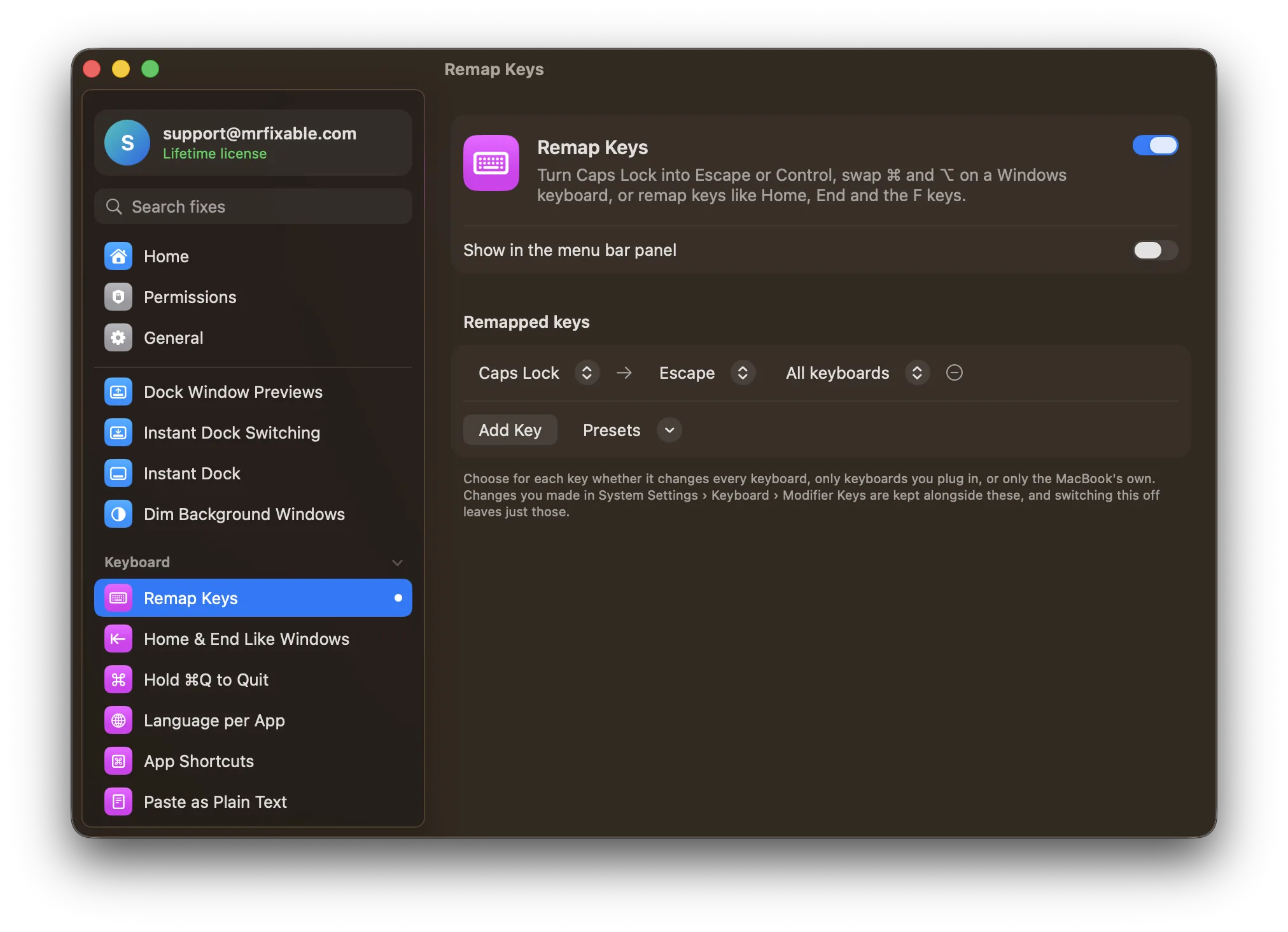
- Remap KeysSystem Settings › Keyboard › Keyboard Shortcuts › Modifier Keys can change Caps Lock, Control, Option, Command and Globe, and nothing else. Remap Keys remaps 26 keys, such as Caps Lock to Escape, Home, End, Page Up and a Windows keyboard's Insert and Menu keys, in every app, on all keyboards or just one kind.
- Lock Keyboard for CleaningmacOS can't switch the keyboard off, and locking the screen with ⌃⌘Q doesn't help, because wiping still types into the password field. Lock Keyboard for Cleaning turns off every key, including brightness, volume and media keys, while your mouse and trackpad keep working. Click Unlock when you're done, or it unlocks after 2 minutes.
- Home & End Like WindowsOn a Mac, Home and End scroll to the top and bottom of the document without moving the cursor. macOS uses ⌘← and ⌘→ for the line. Home & End Like Windows makes Home and End jump to the start and end of the line while you type, with ⌃ for the top and bottom and ⇧ to select.
- Hold ⌘Q to Quit⌘Q sits next to ⌘W and ⌘Tab, so one slip quits a whole app. macOS only lets you change one app's Quit shortcut at a time, in System Settings › Keyboard › Keyboard Shortcuts › App Shortcuts. Hold ⌘Q to Quit keeps ⌘Q in every app, but quits only when you hold it, 0.8 seconds by default.
- Keyboard Language per AppmacOS uses one keyboard language for every app, so after replying in Arabic in WhatsApp you're still typing Arabic in your code editor. You switch by hand with ⌃Space or the input menu. Keyboard Language per App remembers the language you last used in each app and switches to it as soon as that app comes to the front.
- App ShortcutsThe built-in way to open an app from the keyboard is ⌘Space: Spotlight opens, you type the name and press Return. The Shortcuts app can make one key combination per app, but pressing it again won't hide the app. App Shortcuts lets you record a shortcut, like ⌃⌥S, that opens, switches to or hides any app.
- Paste as Plain TextMany Mac apps paste without formatting with Edit › Paste and Match Style, or ⌥⇧⌘V, but not every app has it, and some keep links. Paste as Plain Text makes ⌥⇧⌘V paste only the text in every app, with no fonts, colors or links, and keeps your formatted copy for a normal ⌘V.
- Clipboard HistorymacOS 26 Tahoe added a clipboard history to Spotlight: press ⌘Space, then ⌘4. Earlier versions keep only your last copy. Clipboard History works from macOS 14.2: press ⌘⇧V in any app, pick one of your recent copies, and it's pasted right where you're typing. Copies from password managers are never kept.
- Text SnippetsmacOS has Text Replacements in System Settings › Keyboard, but they work only in apps that support them and can't fill in the date. Text Snippets turns a short code like ;addr into your full address, signature or reply in any app, and can add today's date, the time or what's on your clipboard.
Questions
What does Command-Q do on a Mac?
Command-Q (⌘Q) quits the app in front, closing all its windows at once. Three nearby shortcuts do less: ⌘W closes only the front window. ⌘H hides the app. ⌘Tab switches to another app. One slip between them is easy. With Hold ⌘Q to Quit on, an app quits only when you hold ⌘Q for a moment.How do I turn off hold Command-Q to quit on a Mac?
It depends where the hold comes from. In Chrome: 1. Click Chrome in the menu bar. 2. Choose Warn Before Quitting to remove its tick. In MrFixable: 1. Open MrFixable's settings. 2. Switch Hold ⌘Q to Quit off, or set a shorter hold, down to 0.3 seconds. ⌘Q then quits straight away again.How do I set the keyboard language on a Mac?
1. Open System Settings › Keyboard. 2. Under Text Input, click Edit next to Input Sources. 3. Click +, choose the language and layout, then click Add. 4. Switch languages from the input menu in the menu bar or with ⌃Space. Keyboard Language per App then switches each app to its own language for you.How do I open an app with a shortcut on a Mac?
1. Turn on App Shortcuts in MrFixable. 2. Click Add App… and choose one or more apps. 3. Click the recorder next to each app and press the keys you want, such as ⌃⌥S. That shortcut now opens the app from anywhere, brings it forward if it's running, and hides it if it's already in front.How do I open applications on a Mac with a keyboard shortcut?
1. Press ⌘Space to open Spotlight. 2. Type the first letters of the app's name. 3. Press Return when it's highlighted. That works for every app with no setup. To skip the typing, give your most-used apps their own key combination in App Shortcuts, and one press opens each of them.How do I remap my Mac keyboard?
1. Open System Settings › Keyboard. 2. Click Keyboard Shortcuts, then Modifier Keys. 3. Choose a keyboard and set what Caps Lock, Control, Option, Command and Globe do. Other keys, like Home, End or §, can't be changed there. Remap Keys covers 26 keys, with presets such as Caps Lock to Escape.How do I disable Caps Lock on a Mac?
1. Open System Settings › Keyboard. 2. Click Keyboard Shortcuts, then Modifier Keys. 3. Set Caps Lock key to No Action and click Done. To turn Caps Lock into something useful instead, Remap Keys has ready-made presets for Caps Lock to Escape and Caps Lock to Control that work in every app.