
SoundMicrophone Mute Shortcut
Mute your mic on Mac with one shortcut
To mute your mic on a Mac, open System Settings › Sound › Input and drag Input volume all the way left, or use the mute button in each call app. macOS has no shortcut that mutes the microphone itself. Microphone Mute Shortcut mutes it in every app at once with ⌃⌥M (Control-Option-M).
Try free for 14 daysBuy for $19.99 Lifetime license
One of 68 fixes in MrFixable. Lifetime license, no subscription. Updated October 22, 2026. Works on macOS 14.2 Sonoma and later. Checked on macOS 26 Tahoe.
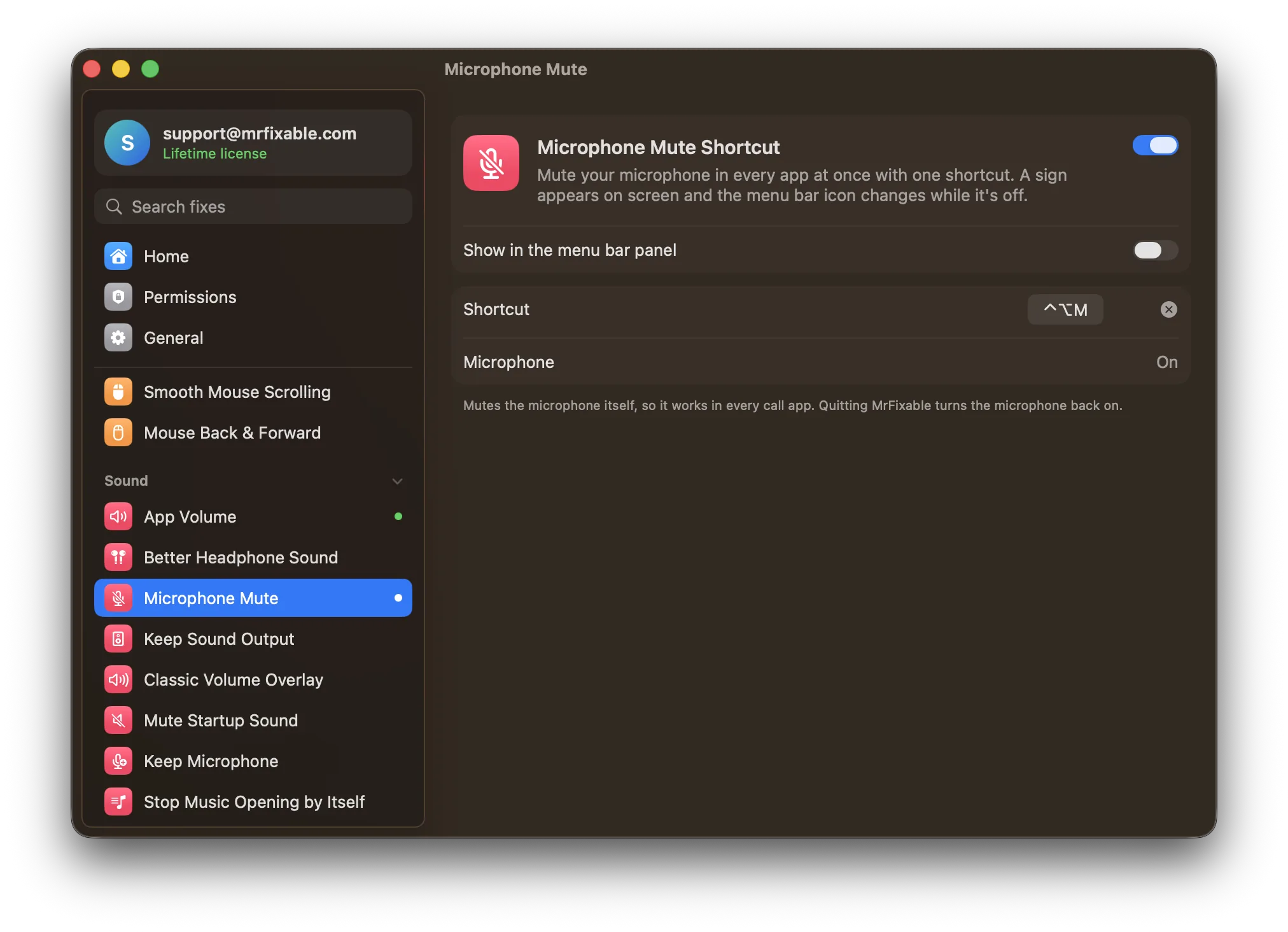
What Microphone Mute Shortcut does
The problem
Zoom, Teams, Meet and other call apps each have their own mute button and shortcut, and each only mutes you in that one app. Turning Input volume down in System Settings › Sound takes several clicks, and it's easy to forget to turn it back up.
With Microphone Mute Shortcut
Press ⌃⌥M and the microphone itself goes silent, in every app at once. A sign appears on screen, and the MrFixable icon in the menu bar shows a crossed-out microphone until you turn it back on.
- One shortcut, every app⌃⌥M mutes and unmutes the microphone. Change it to any shortcut you like, or remove it. If another app already uses it, MrFixable tells you.
- Always know if you're mutedMicrophone Off or Microphone On appears on screen each time you press it. The MrFixable menu shows the microphone's state, with a button to turn it off or on.
- Follows your microphoneSwitch microphones while you're muted, and the new one is muted too. A microphone with no mute switch is turned down to zero, and its level comes back when you unmute.
Good to know
It's a toggle, not push to talk: press the shortcut once to mute, and again to unmute.
Your call app's own mute button doesn't change, because the microphone is muted underneath it. People hear silence either way.
If a microphone can't be muted, MrFixable shows This microphone can't be muted, instead of telling you it's off.
Switch it off or quit MrFixable, and the microphone is turned back on, so you're never left muted without knowing.
Questions
How do I turn off the microphone on Mac?
macOS has no off switch, but you can silence it: 1. Open System Settings › Sound. 2. Click Input. 3. Drag Input volume all the way left. Drag it back when you need it. With Microphone Mute Shortcut, press ⌃⌥M instead to turn the microphone off for every app, and again to turn it on.How do I disable the Mac microphone?
Block apps from it: 1. Open System Settings › Privacy & Security. 2. Click Microphone. 3. Turn off the switch for each app you don't want listening. Apps not in that list haven't asked yet. To silence it for every app for a while, use Microphone Mute Shortcut and press ⌃⌥M.How do I mute the Mac microphone?
1. Click the MrFixable icon in the menu bar and switch on Microphone Mute Shortcut. 2. Press ⌃⌥M (Control-Option-M). 3. Microphone Off appears on screen, and the menu bar icon shows a crossed-out microphone. Press ⌃⌥M again to unmute. Without MrFixable, use each call app's own mute button.Why is there a microphone icon on my Mac?
An orange dot or microphone icon in the menu bar means an app is using your microphone. To check: 1. Click Control Center in the menu bar. 2. Look at the top, which names the app using it. 3. Quit that app, or turn it off in System Settings › Privacy & Security › Microphone.Does it work with Zoom, Teams and Google Meet?
Yes. Microphone Mute Shortcut mutes the microphone itself, not one app, so it works in Zoom, Teams, Google Meet in the browser, FaceTime and every other app at once. The call app's own mute button doesn't change, but people hear silence either way until you press the shortcut again.Is there push to talk on Mac?
Not built into macOS, and Microphone Mute Shortcut isn't push to talk either. It's a toggle: press ⌃⌥M once to mute your microphone in every app, and press it again to unmute. You can change the shortcut in the fix's settings to any keys you find easy to reach.
Sources
Guides
- How to turn off the microphone on a MacHow to turn off the microphone on a Mac in Sound settings, block apps from using it, see why a mic icon shows, and mute every app with one shortcut.
- Mac input volume or microphone keeps changing? How to stop itZoom or Chrome keeps moving your Mac's mic input volume, or your Mac switches to a webcam or iPhone mic. Why it happens, the settings that help, and the fix.
- Why AirPods sound muffled on Mac calls, and how to fix itAirPods turn muffled the moment a Mac app uses their microphone. Why Bluetooth does this, the fix in System Settings › Sound › Input, and how to keep it fixed.