
System & FinderDefault Apps
Change the default app for a file type on Mac
To change the default app for a file type on a Mac, select a file of that type, press ⌘I, pick an app under Open with and click Change All. That sets one type at a time. Default Apps lists text, PDFs, images, videos, code, and web and email links on one page, and one choice sets a whole group.
Try free for 14 daysBuy for $19.99 Lifetime license
One of 68 fixes in MrFixable. Lifetime license, no subscription. Updated October 22, 2026. Works on macOS 14.2 Sonoma and later. Checked on macOS 26 Tahoe.
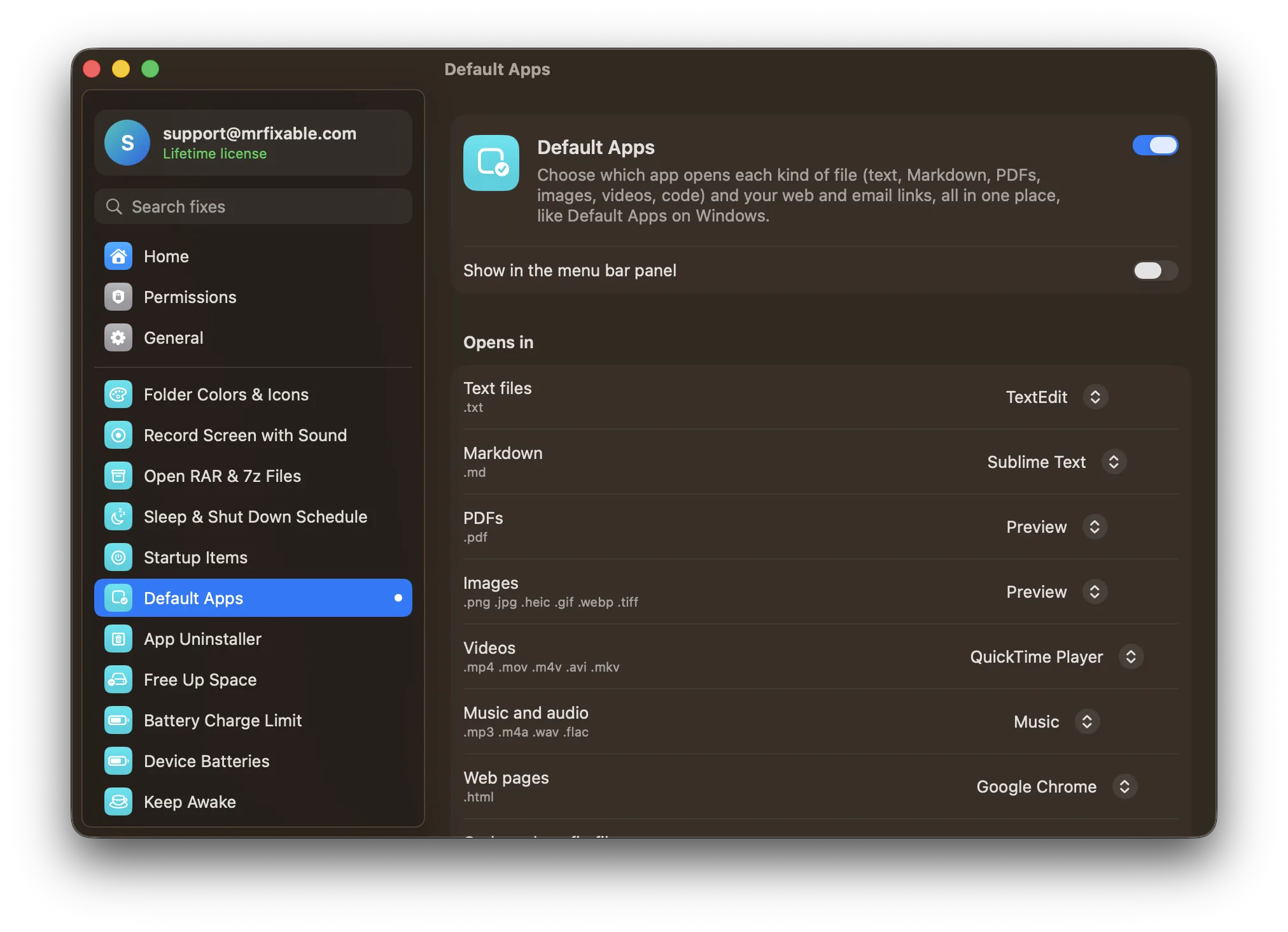
What Default Apps does
The problem
macOS sets default apps one file type at a time: select a file, open Get Info, pick an app under Open with and click Change All. Your browser is set in System Settings and your email app in Mail's settings, so there's no single place to see it all.
With Default Apps
One page lists text files, Markdown, PDFs, images, videos, music, web pages, code, CSV and ZIP files, plus web and email links, each with the app that opens it now. Pick another app from the menu and it's changed.
- Whole groups at onceImages covers .png, .jpg, .heic, .gif, .webp and .tiff, and Code and config files covers .json, .js, .py, .swift, .css, .xml, .yaml and .sh. One choice sets every type in the group that the app can open.
- Add your own typesType a file type, like .csv or .docx, to add a row for it. Remove it from the list any time.
- Browser and email tooSet the app that opens web links and email (mailto) links on the same page. macOS asks you to confirm a new default browser.
Good to know
These are your Mac's own settings, the same as Get Info › Open with › Change All. They stay even if you switch this fix off.
Each list shows only the apps on your Mac that can open that kind of file. For files, browsers go at the end, after the apps made for them.
Questions
How do I set default applications on a Mac?
Set each kind in its own place. 1. For a file type, select a file, press ⌘I, choose an app under Open with and click Change All. 2. For web links, open System Settings › Desktop & Dock and pick a Default web browser. 3. For email, open Mail › Settings › General and pick a Default email reader.How do I change Mac default apps?
Use Default Apps to change them on one page. 1. Open MrFixable and click Default Apps. 2. Find the kind of file, such as PDFs or Images. 3. Pick an app from its menu. 4. For a type that isn't listed, type it, like .docx, and click Add. Every file of that kind then opens in your choice.How do I set the default app for a file type on a Mac?
Use Get Info and Change All. 1. Select a file of that type in Finder. 2. Press ⌘I, or choose File › Get Info. 3. Open the Open with section. 4. Choose an app from the menu. 5. Click Change All and confirm. Every file with that extension now opens in that app.How do I change the default app for a file type on a Mac?
Click Change All in Get Info, not just Open With. 1. Select the file and press ⌘I. 2. Pick the new app under Open with. 3. Click Change All. Right-click › Open With opens a file once, and holding Option there gives Always Open With, which changes only that one file.Why do my code files open in Xcode on a Mac?
Installing Xcode can make it the default for code and text files such as .swift, .json or .py. Fix each type with Get Info › Open with › Change All, or, in Default Apps, pick your editor under Code and config files, and every type in that group that your editor opens changes at once.