
iStat Menus alternative for Mac
By Mohammed Chaara. Updated October 21, 2026. Facts about iStat Menus come from its own website or App Store page, listed at the end.
What iStat Menus is
iStat Menus puts system information in the menu bar: CPU and GPU use, memory with pressure and swap, disks with activity and S.M.A.R.T. status, network bandwidth per app, battery and power, the battery of Bluetooth devices like AirPods, and sensors for temperatures, fans, voltages and power, with fan speed control. It also has weather, menu bar clocks, world clocks and a calendar, rules that send notifications, and a Combined mode that groups items into one. Bjango sells it for $11.99 for a single license or $14.99 for a family license for up to 5 people, with a 14-day free trial. Weather is included for 6 months, then the Mac App Store version charges $4.99 a year or $0.99 a month. It needs macOS 13.5 or later (macOS 14 for the App Store version) and is also part of Setapp.
iStat Menus vs MrFixable
| iStat Menus | MrFixable | |
|---|---|---|
| Price | $11.99 single license, $14.99 family license for up to 5 people; also in Setapp | $19.99 once (Lifetime license) for all 68 fixes |
| Free trial | 14 days | 14 days |
| In the menu bar | CPU, GPU, memory, disks, network, sensors, battery, weather and time, as separate items or combined | CPU, GPU, CPU temperature and memory, plus network speed if you turn it on, in one item |
| When you click | History, per-core use, top apps, per-app network and disk use, S.M.A.R.T. status and more | GPU temperature, fan speeds, network speed, battery temperature, health and cycle count, and the 6 apps using the most CPU and memory |
| Fan control | Yes | No, it shows fan speeds only |
| Alerts | Rules that send notifications, for example on high CPU use | No |
| Weather, clocks and calendar | Weather (6 months included, then a subscription), clocks, world clocks and a calendar | Calendar in the Menu Bar is a separate fix; no weather |
| macOS | macOS 13.5 or later (Mac App Store version: macOS 14 or later) | macOS 14.2 Sonoma or later |
Where each one is better
- It monitors far more: disks, per-app network use, voltages, power, and memory and network history.
- It can control fan speeds and send notifications when something needs your attention.
- It has weather, world clocks and many ways to customize what the menu bar shows.
- At $11.99 it costs less than MrFixable if a system monitor is all you want.
- It runs on macOS 13.5 Ventura and later, and it's on the Mac App Store and Setapp.
- Click the stats to see the 6 apps using the most CPU and memory, with each app's helpers counted together, and quit one right there.
- Rows stay in place while your pointer is over the list, so you don't quit the wrong app.
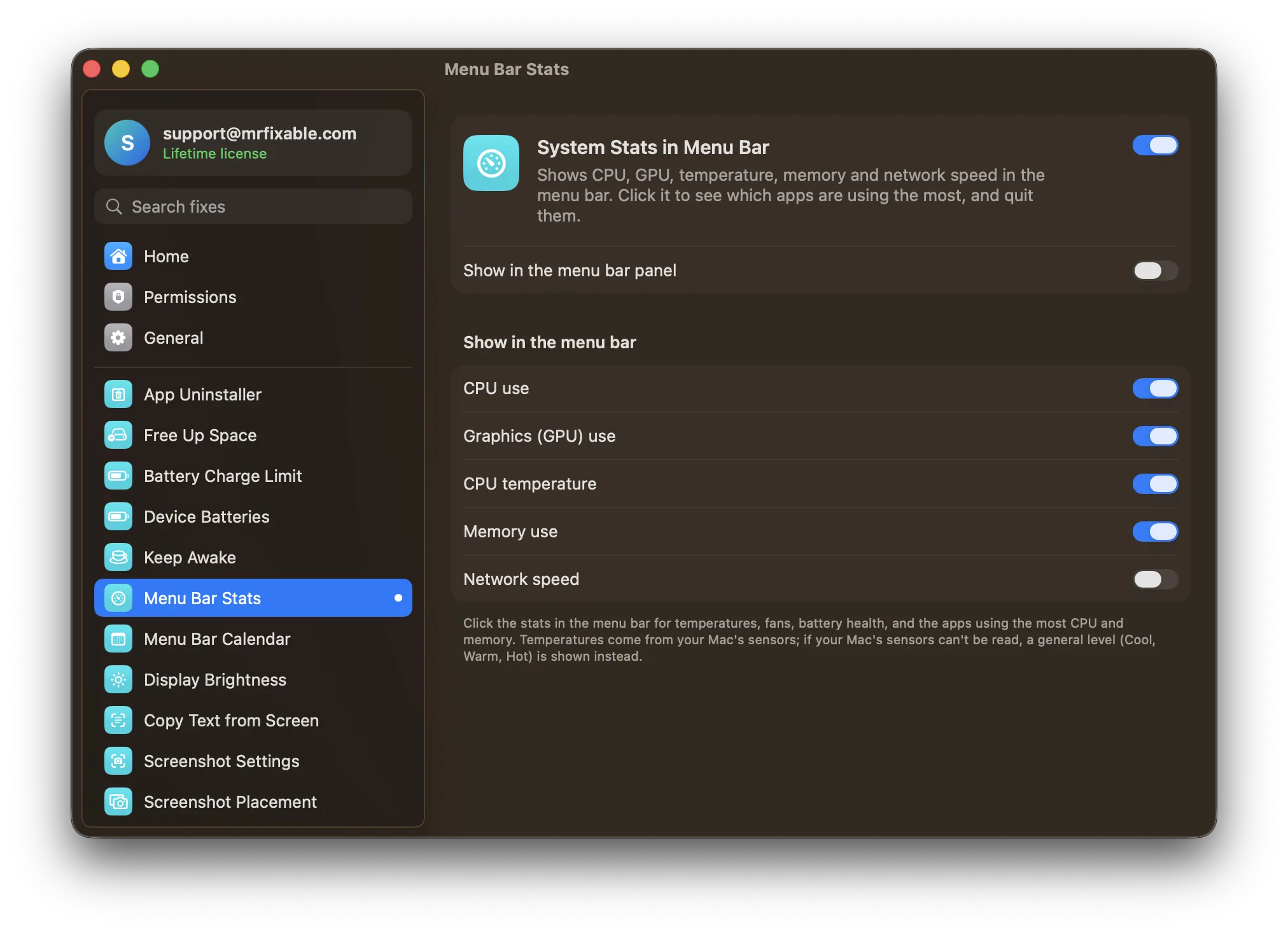
- It's simple: five switches choose what shows, with CPU, GPU, temperature and memory on to begin with.
- If your Mac's sensors can't be read, it shows a general level like Cool, Warm or Hot instead of nothing.
- It comes with Device Batteries, Calendar in the Menu Bar and MrFixable's other fixes for $19.99 once.
Switching from iStat Menus
Quit iStat Menus so you don't see the same numbers twice in the menu bar. In MrFixable, turn on System Stats in Menu Bar and choose what to show: CPU use, Graphics (GPU) use, CPU temperature, Memory use and Network speed. For the battery of AirPods and other Bluetooth devices, turn on Device Batteries. For a month view and the day's events from the menu bar date, turn on Calendar in the Menu Bar.
Questions
Is there a task manager for Mac?
Yes. It's called Activity Monitor, and it's in Applications › Utilities. It lists every app and process with its CPU, memory, energy, disk and network use, and can quit them. Press ⌥⌘Esc (Option-Command-Escape) for a quick Force Quit window. System Stats in Menu Bar keeps the main numbers in your menu bar.How do I open Task Manager on a Mac?
Press ⌘Space (Command-Space), type Activity Monitor and press Return. Or in Finder, choose Go › Utilities and double-click Activity Monitor. To quit a frozen app fast, press ⌥⌘Esc. With System Stats in Menu Bar on, click the stats in the menu bar to see and quit the busiest apps.Is iStat Menus a one-time purchase?
Yes, for the app itself. Bjango sells iStat Menus 7 for $11.99 for a single license or $14.99 for a family license, with a 14-day free trial. Weather is included for 6 months and then needs a subscription, which the Mac App Store lists at $4.99 a year or $0.99 a month.Can MrFixable control fan speed?
No. System Stats in Menu Bar shows fan speeds and CPU and GPU temperatures, but it doesn't change how fast the fans spin. iStat Menus can control fan speeds, according to its website. If your Mac's sensors can't be read, MrFixable shows a general level like Cool, Warm or Hot instead.