
Magnet alternative for Mac
By Mohammed Chaara. Updated October 21, 2026. Facts about Magnet come from its own website or App Store page, listed at the end.
What Magnet is
Magnet is a window manager sold on the Mac App Store for $4.99, with no in-app purchases and no subscription. You snap windows by dragging them to screen edges and corners, with keyboard shortcuts, from its menu bar icon or from the green button's menu. It has halves, quarters, thirds, two thirds and full screen, lets you make custom commands, supports up to six external displays and vertical displays, and can sync its settings through iCloud. It requires macOS 13 or later.
Magnet vs MrFixable
| Magnet | MrFixable | |
|---|---|---|
| Price | $4.99 on the Mac App Store, no subscription | $19.99 once (lifetime license) for all 68 fixes, with a 14-day free trial |
| macOS support | macOS 13 or later | macOS 14.2 Sonoma or later, tested on macOS 26 Tahoe |
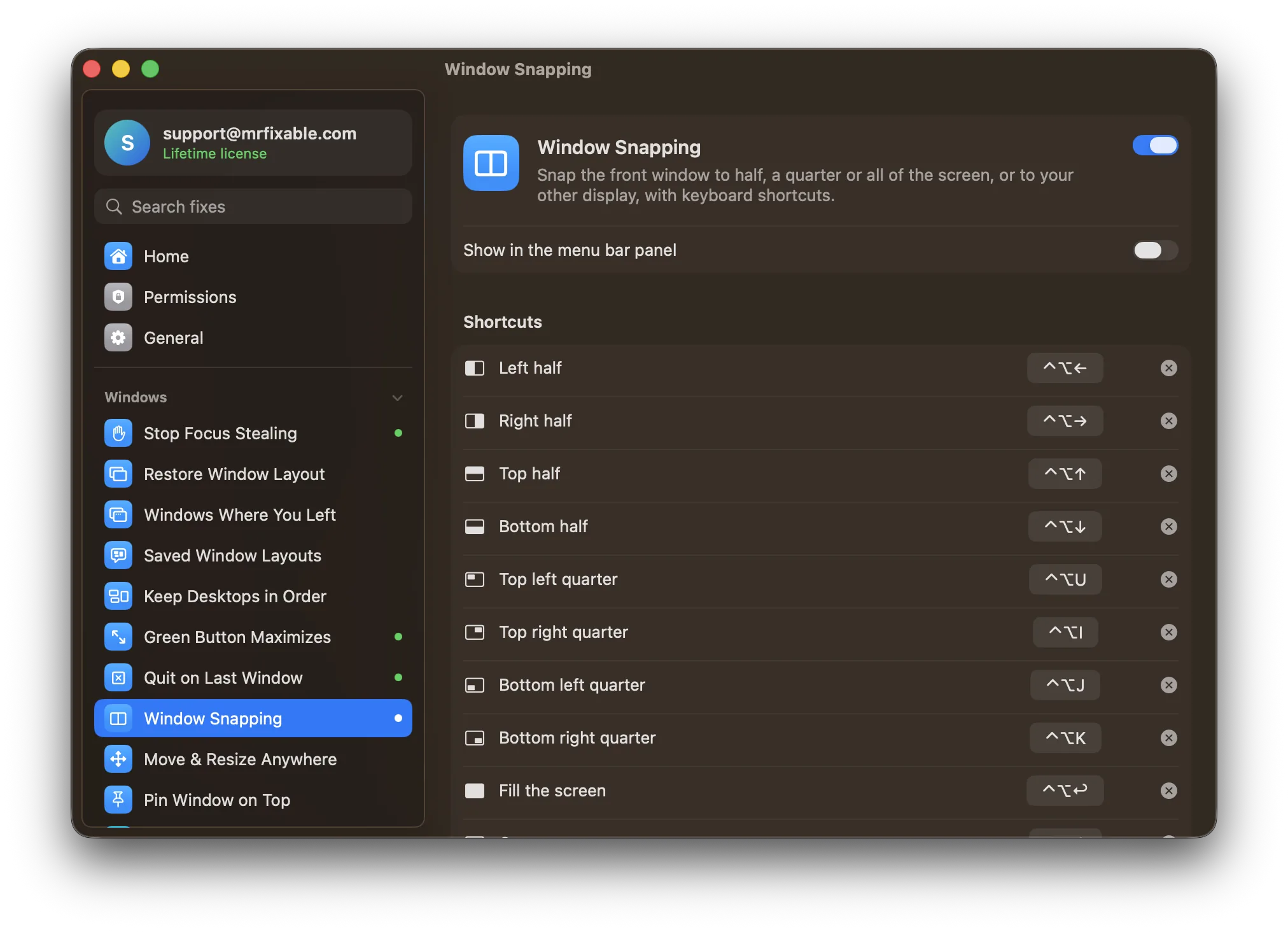
| Keyboard shortcuts | Yes, customizable | Yes, one for every position; change or clear any of them |
| Drag to a screen edge | Yes, edges and corners | No. On macOS 15 and later, macOS's own tiling does this |
| Window sizes | Halves, quarters, thirds, two thirds, full screen, plus custom commands | Halves, quarters, fill the screen and center |
| Other displays | Up to six external displays, and vertical displays | ⌃⌥⌘→ moves the window to your next display |
| Other ways to snap | Menu bar icon and the green button's menu | Keyboard shortcuts only |
| Settings sync | Optional iCloud sync | No |
| What else is included | Window snapping only | 67 other fixes, like Window Switcher and Saved Window Layouts |
Where each one is better
- It costs less if window snapping is all you want: $4.99 against $19.99.
- It snaps windows you drag to an edge or corner, on every macOS it supports, including macOS 13 and 14.
- More sizes: thirds and two thirds, plus custom commands for the sizes you want.
- You can snap from its menu bar icon or the green button's menu, without remembering shortcuts.
- It syncs its settings through iCloud and runs on macOS 13 Ventura.
- It comes with 67 other fixes, such as Window Switcher, Move & Resize from Anywhere and Saved Window Layouts, for one $19.99 lifetime license.
- If Magnet or another window manager is running, Window Snapping tells you, and it marks any shortcut another app already uses, so you know why a shortcut doesn't work.
- You can try every fix free for 14 days before you buy.
Switching from Magnet
Quit Magnet, and if it opens at login, remove it in System Settings › General › Login Items & Extensions, so two apps don't fight over the same shortcuts. Then turn on Window Snapping in MrFixable and allow Accessibility access. Check the shortcut list in its settings: if you were used to other keys, record them there, or clear the ones you don't need.
Questions
How much does Magnet cost?
Magnet costs $4.99 on the Mac App Store, as a one-time purchase with no in-app purchases or subscription. MrFixable costs $19.99 once, with a 14-day free trial, and Window Snapping is one of its 68 fixes. If snapping windows is all you need, Magnet is the cheaper choice.Can MrFixable snap windows by dragging them to the edge?
No. Window Snapping works with keyboard shortcuts. On macOS 15 or later, macOS tiles a window you drag to the left or right edge or a corner; turn it on in System Settings › Desktop & Dock under Windows. Magnet snaps windows you drag on macOS 13 and 14 too.Does MrFixable snap windows into thirds?
No. Window Snapping has halves, quarters, fill the screen, center and move to the next display. If you work with three windows side by side, Magnet's thirds are the better fit. MrFixable's Saved Window Layouts can put a whole set of windows back where you arranged them, at any size.Can I use Magnet and MrFixable together?
Yes, but give each shortcut to one app. When Magnet is running, Window Snapping shows a warning, because both use the same kind of shortcuts. Clear the matching shortcuts in one of them, or switch Window Snapping off and keep using MrFixable's other fixes next to Magnet.