
To disable the MacBook startup sound, or the chime on any Mac, open System Settings › Sound and turn off Play sound on startup. Your Mac starts up silently from then on. It's one switch, saved in the Mac itself. Mute Startup Sound in MrFixable flips the same switch, with the rest of your fixes.
The startup chime is loud, and it plays before you can do anything about the volume. In a library, a meeting or a sleeping house, that's a problem. Here's how to switch it off and back on.
Turn off the startup sound in System Settings
- Choose Apple menu › System Settings.
- Click Sound in the sidebar. You may need to scroll down.
- Turn off Play sound on startup.
- That's it. The next time you turn on or restart your Mac, it starts silently.
To bring the chime back, turn Play sound on startup on again. The steps are the same on a MacBook Air, MacBook Pro, iMac, Mac mini or Mac Studio running macOS 13 Ventura or later. On macOS 11 Big Sur and macOS 12 Monterey, the switch is in System Preferences › Sound › Sound Effects.
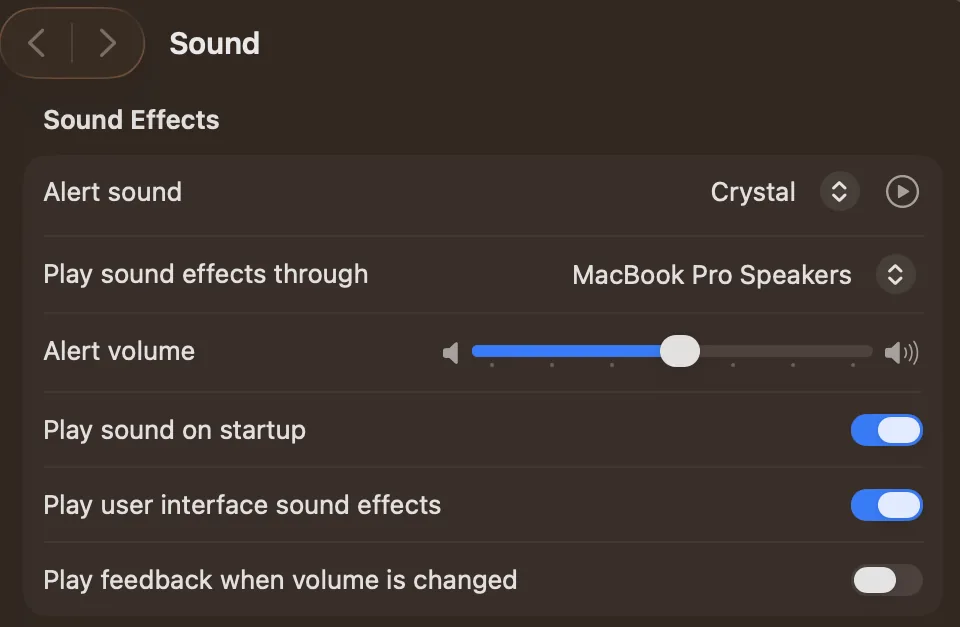
Real screenshot from a MacBook Pro (13-inch, M1, 2020) running macOS 26.1, taken October 22, 2026.
Turn it off with Terminal
The switch in System Settings stores one setting in your Mac's memory, called StartupMute. You can set it yourself:
- Open Terminal from Applications › Utilities.
- Type
sudo nvram StartupMute=%01and press Return. - Type your Mac's password and press Return. Nothing shows while you type it.
To turn the chime back on, run sudo nvram StartupMute=%00 the same way. The result is exactly the same as the switch in System Settings, so most people should just use that.
What is the Mac startup sound?
The Mac startup sound, or startup chime, is the tone your Mac plays the moment you turn it on, before macOS has loaded. It tells you the Mac has power and is starting up. The switch to turn it off arrived in macOS 11 Big Sur. Before that, macOS had no setting for it.
- It plays when you turn the Mac on and when you restart it, not when it wakes from sleep.
- The setting is stored in the Mac, not in your user account, so it applies to everyone who uses that Mac.
- You can only turn it on or off. macOS has no way to replace it with another sound.
Mute the startup sound with MrFixable
Mute Startup Sound is the same setting as Play sound on startup in System Settings. If you're already setting up your Mac with MrFixable, it's one more switch in the same place, and its settings show whether the chime is muted or plays when your Mac turns on.
- Turn on Mute Startup Sound in MrFixable.
- macOS asks for your password, because the setting is stored in the Mac itself. Enter it.
- Your Mac now starts silently.
Things to know:
- It stays muted even if you delete MrFixable, because the setting lives in the Mac, not in the app.
- Turning the fix off brings the chime back. macOS asks for your password again.
- If you turn the chime back on in System Settings, MrFixable notices and switches the fix off, instead of asking for your password out of the blue.
If muting the chime is all you need, the switch in System Settings does it for free. MrFixable is worth it when you also want its other fixes.
Questions
How do I mute the Mac startup sound?
Open System Settings › Sound and turn off Play sound on startup. The Mac starts silently from the next time you turn it on or restart, and it stays that way for every user of that Mac. To hear the chime again, turn the same switch back on.
How do I change the Mac startup sound?
You can't. macOS has no setting to replace the startup chime with another sound, and the chime plays before macOS loads, so other apps can't change it either. The only choice is on or off: turn Play sound on startup on or off in System Settings › Sound.
How do I turn off the MacBook Pro startup sound?
The same way as on any Mac: open System Settings › Sound and turn off Play sound on startup. It works on every MacBook Pro running macOS 13 Ventura or later. You can also run sudo nvram StartupMute=%01 in Terminal, which changes the same setting.
Why doesn't my Mac play a startup sound?
Usually because Play sound on startup is turned off in System Settings › Sound, either by you, by an app, or by a Terminal command. Turn the switch on, then restart to hear the chime. If MrFixable's Mute Startup Sound is on, turn it off, and the chime comes back.